Full Lobby, Any Screen
Every slot, live dealer table, and jackpot game loads in your mobile browser without any download or installation.
App at Oshi Casino: Mobile Deposits & Withdrawals
No app download required. Access 5,000+ slots, Evolution Gaming live tables, Visa and crypto deposits, and your full CAD account from any iOS or Android browser.
Mobile Security Best Practices
What You Should Do
What You Should Avoid
Mobile Experience Overview
Pros
Cons
Your Full Casino in a Browser Tab
No app download required. Access 5,000+ slots, Evolution Gaming live tables, Visa and crypto deposits, and your full CAD account from any iOS or Android browser.
Open on Mobile Play responsibly: gambling carries a risk of dependency. Players must be 19+ (18+ in Alberta, Manitoba, and Quebec). Bonus terms apply.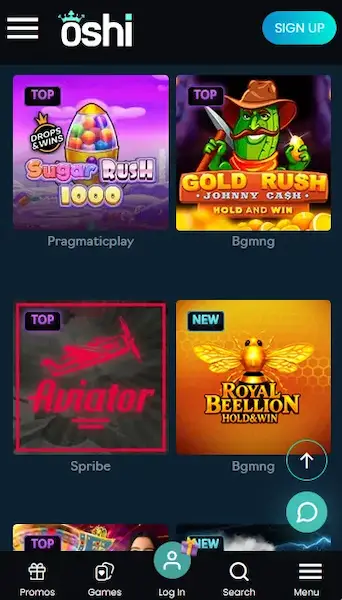
How to Start Playing on Mobile
What Sets the Oshi Mobile Experience Apart
Full Lobby, Any Screen
Every slot, live dealer table, and jackpot game loads in your mobile browser without any download or installation.
Instant Game Launch
HTML5 games from BGaming, Pragmatic Play, and Evolution Gaming open in one tap with no load screens or plugin requirements.
Secure Mobile Sessions
TLS encryption protects your CAD account and payment data on every mobile session, with optional 2FA for added login security.
Device Requirements
Android
iOS
Oshi Casino does not publish a native iOS or Android application, but the mobile browser experience covers every feature available on the full desktop site. This is a deliberate design choice: rather than a separate app with limited functionality, the entire platform is built on responsive HTML5 technology that adjusts automatically to any screen resolution.
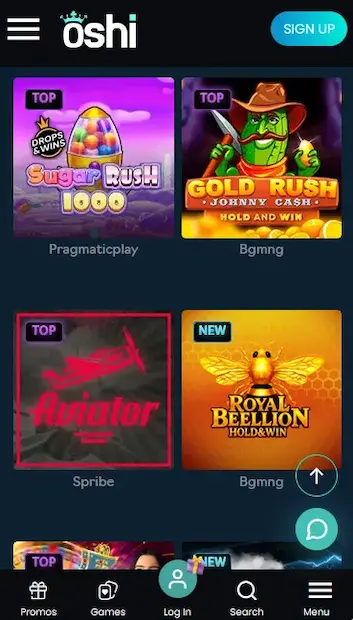
The mobile layout includes the complete game lobby organized by category (slots, live casino, table games, jackpots, and game shows), a unified cashier that supports Visa, Maestro, Mastercard, and cryptocurrency, a real-time bonus tracker showing wagering progress, live chat support accessible from any page, and the full account management dashboard including KYC document upload.
The mobile experience is functionally identical to the desktop version. The primary difference is layout: navigation shifts from a horizontal top menu to a collapsible mobile menu, and game tiles resize for thumb-friendly tapping. Some high-bandwidth live game shows from Evolution Gaming, such as Crazy Time, perform best on Wi-Fi or 4G rather than a slower 3G connection. All other features, including Rainbow Riches jackpot slots and the Loot Wheel, operate identically on mobile and desktop.
The full Oshi slots catalogue, covering more than 5,000 titles, is accessible on mobile. Featured titles include BGaming’s Aztec Magic Deluxe (RTP 96%), Lucky Lady Moon (RTP 96%), Pragmatic Play’s Gates of Olympus (RTP 96.5%), Netgame’s Luck of Panda and Bfgames’ Buffalo Trail Cash Blitz. High-volatility titles from Pragmatic Play and Rainbow Riches progressive jackpot slots all load on mobile within a single tap.
Evolution Gaming’s live dealer room streams Lightning Roulette, Blackjack VIP, Speed Baccarat, Golden Baccarat, and Casino Hold’em in HD directly to your mobile browser. Ezugi’s Dragon Tiger and Pragmatic Play Live’s tables are also fully playable on mobile. HTML5 video streaming means no additional plugin is needed on modern iOS or Android browsers.
RNG-based table games including European roulette, American roulette, blackjack variants, and video poker run without any performance difference on mobile. The random number generator for each title is certified independently by its provider (eCOGRA or iTech Labs depending on the studio).
Rainbow Riches progressive jackpot slots display live jackpot counter values in the mobile lobby and pay out through the same mechanism as the desktop version. No pool separation applies between device types.
The Oshi mobile site is confirmed compatible with iOS 12 or higher using Safari and Android 5.0 or higher using Chrome. No Flash plugin, no Java, and no third-party browser extension is required. Most modern smartphones released from 2017 onward meet these requirements comfortably.
On Android, the Chrome browser provides the most consistent experience, including support for the Add to Home Screen PWA prompt. Firefox and other Chromium-based browsers also work, though PWA shortcut support may vary by browser version.
On iOS, Safari is the recommended browser for Oshi, as it natively supports the Add to Home Screen function that creates the home screen shortcut. Chrome for iOS can be used for browsing and gameplay, but the home screen shortcut must be added through Safari to function as a full-screen shortcut.
| Feature | Android | iOS |
|---|---|---|
| OS version | Android 5.0+ | iOS 12+ |
| Recommended browser | Chrome 80+ | Safari 14+ |
| Connection for slots | 3G or Wi-Fi | 3G or Wi-Fi |
| Connection for live casino | 4G or Wi-Fi | 4G or Wi-Fi |
| Storage for shortcut | Under 1 MB | Under 1 MB |
Open Chrome on your Android device and navigate to oshi24.com. Sign in or register a new account. To install the PWA shortcut, tap the three-dot menu at the top right of Chrome and select Add to Home Screen. Name the shortcut (for example, Oshi Casino) and tap Add. The shortcut appears on your home screen and opens oshi24.com in a full-screen view without the browser address bar, replicating a native app experience.
Open Safari on your iPhone or iPad and go to oshi24.com. Sign in or create a new CAD account. Tap the Share button (the box with an upward arrow) at the bottom of the Safari screen. Scroll through the share options and tap Add to Home Screen. Give the shortcut a name and tap Add. The icon appears on your home screen. Tapping it launches oshi24.com in full-screen Safari without the navigation bar.
Because Oshi delivers its mobile experience as a PWA rather than a native app, there is no file to download and no App Store or Google Play listing to find. The shortcut method described above for both Android and iOS is the complete installation process. Updates happen automatically on the server side, so the shortcut always points to the current version of the site.
The mobile cashier at oshi24.com supports the same full range of deposit and withdrawal options as the desktop version. Canadian players can deposit via Visa, Maestro, Mastercard, Bitcoin, Bitcoin Cash, Ethereum, Litecoin, Ripple, and Tether (USDT). CAD is the primary account currency, and card deposits are processed instantly with no conversion fee.
| Method | Deposit Speed | Withdrawal Time |
|---|---|---|
| Visa / Maestro / Mastercard | Instant | 1-5 business days |
| Bitcoin / Bitcoin Cash | Instant | Up to 1 hour |
| Ethereum / Litecoin | Instant | Up to 1 hour |
| Ripple / Tether (USDT) | Instant | Up to 1 hour |
Every transaction processed through the Oshi mobile cashier is protected by TLS encryption. Cryptocurrency transactions use blockchain confirmation for added integrity. KYC verification (passport, driver’s licence, or provincial photo ID card, plus a utility bill or bank statement) is required before the first large withdrawal and may be triggered earlier at the operator’s discretion.
To open a new Oshi account from mobile, visit oshi24.com in your browser, tap Register, and complete the form with a username, valid email address, password, and currency selection (CAD). Confirm your email address via the verification link sent to your inbox. Your account is immediately active and eligible for the welcome package of up to $6,000 + 450 Free Spins for players aged 19 or older (18+ in Alberta, Manitoba, and Quebec).
Return visits require only your email address and password. If 2FA is enabled, a one-time code from your authenticator app or SMS is required after the password step. Session cookies keep you logged in on your personal device between visits; you can clear them manually for additional security. Detailed sign-in troubleshooting is available on the Oshi login page.
The four-deposit welcome package, worth up to $6,000 + 450 Free Spins, is fully claimable through the mobile browser. Each qualifying deposit of $30 CAD or more triggers the corresponding bonus stage automatically. Free spins on BGaming’s Aztec Magic Deluxe and Lucky Lady Moon can be activated and played directly in the mobile lobby. The 45x wagering requirement, the $5 maximum bet during wagering, and the 5-day validity window all apply regardless of whether you play on desktop or mobile. Full terms are available on the Oshi bonus page.
All data sent between your device and oshi24.com is encrypted using TLS. This applies to login credentials, deposit requests, withdrawal submissions, and document uploads during KYC verification.
Two-factor authentication is available as an optional security enhancement. Once enabled in your account security settings, every login from an unrecognized device requires a one-time code in addition to your password. This protection is especially relevant for mobile use, where devices are more frequently shared or lost.
Oshi does not implement biometric authentication at the website level. However, if your iOS or Android browser is configured to autofill saved passwords authenticated by Face ID, Touch ID, or fingerprint unlock, your device’s biometric check releases the saved Oshi credentials into the login form, providing a functionally equivalent experience.
Live chat is accessible from the support icon on any page of the Oshi mobile site and connects directly to a human agent. Email support is available at [email protected] and is answered within 24 hours. Both channels are available 24 hours a day, 7 days a week, covering all Canadian time zones from Pacific through to Atlantic and Newfoundland Standard Time.
Oshi Casino provides deposit limits, spending limits, cooling-off periods, and self-exclusion options accessible from the responsible gaming section of your account dashboard. These tools function identically on mobile and desktop. If you need to set a limit immediately, contact support via live chat and an agent can apply account restrictions in real time. For help resources beyond the casino, organizations that support Canadian players with gambling concerns are listed on the responsible gaming section of oshi24.com.
App and Mobile FAQs
No. Oshi Casino does not publish a native app on Google Play or the App Store. The full casino experience is delivered through a responsive browser-based site at oshi24.com, which works on Android 5.0+ and iOS 12+.
Yes. The Oshi mobile cashier supports Visa, Maestro, and Mastercard, alongside Bitcoin, Bitcoin Cash, Ethereum, Litecoin, Ripple, and Tether (USDT), from any iOS or Android browser.
Yes. The PWA shortcut always loads the current version of oshi24.com from the server, so there is no manual update process. New games, bonus offers, and site changes appear automatically on your next session.
Yes. Evolution Gaming's live tables, including Lightning Roulette, Blackjack VIP, Crazy Time, and Golden Baccarat, stream in HD on iOS and Android browsers over a standard 4G or Wi-Fi connection.
Open Oshi in Your Browser and Start Playing
Grab 100% up to $6,000 and 450 free spins.
Enter Casino Play responsibly: gambling carries a risk of dependency. Players must be 19+ (18+ in Alberta, Manitoba, and Quebec). Bonus terms apply.